
An XML sitemap is a dedicated file that lists the important URLs on your website, helping search engines discover and crawl your content more efficiently. While it doesn’t guarantee that every page will be indexed, it makes it easier for search engines to understand your website’s structure and find the pages you want them to consider.
As an important part of technical SEO, an XML sitemap can help improve the discoverability of your website, particularly for larger sites, newly published pages or content that may not be easily found through internal links alone.
In this article, we’ll explain what an XML sitemap is, show you what one looks like, explain why it’s important for SEO, how to generate one and how to submit it to Google Search Console.
What Is an XML Sitemap?
An XML sitemap is a file written in extensible markup language that lists the important, indexable pages on your website. Its purpose is to help search engines discover and crawl your content more efficiently by providing a structured list of the URLs you want them to consider.
Think of an XML sitemap as a roadmap for your website. Rather than solely relying on internal links to find your content, search engines can use your sitemap as an additional guide to understand what pages exist and where they can be found.
What Does an XML Sitemap Look Like?
Whilst an XML sitemap is designed for search engines rather than people, it is relatively straightforward to understand. Each entry represents a page on your website and typically includes information such as the page’s URL and in many cases, the date it was last updated.
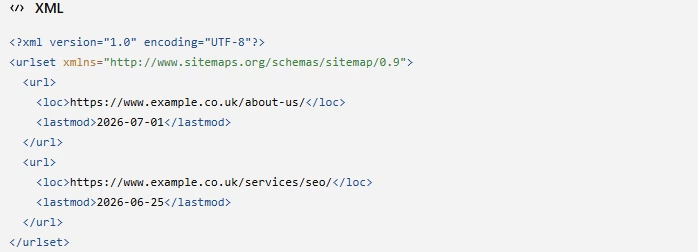
The example above contains a few key elements:
- The <url> represents a single page on your website.
- The <loc> is the full URL of that page.
- The <lastmod> is the date that the page was last significantly updated.
- The <urlset> wraps the entire sitemap file
At first glance, this may look confusing, but don’t panic. Most website owners will never need to edit an XML sitemap manually. Many modern website platforms and SEO plugins will typically generate and update XML sitemaps automatically whenever new pages are added or existing content is updated.
Why Are XML Sitemaps Important for SEO?
Search engines can’t rank pages they struggle to discover. While they can often find content by following internal links, an XML sitemap provides an additional roadmap to your website, helping search engines discover and crawl your important pages more efficiently.
Although it isn’t a direct ranking factor, it plays an important role in supporting a strong technical SEO strategy.
Helps Search Engines Discover Your Content
Search engines primarily discover new content by following links between your pages on your website and across the wider web.
However, some pages can be more difficult to find, particularly on larger websites with hundreds of pages or content that isn’t well connected through internal links.
An XML sitemap provides search engines with a structured list of your important URLs, giving them another way to discover your content. This can be particularly beneficial for newly published pages, larger websites or content that may otherwise take longer to be found.
Supports More Efficient Crawling
Once search engines discover a page, they need to crawl it to understand its content. An XML sitemap provides a structured list of your important URLs, helping search engines identify the pages available to crawl.
This can be particularly beneficial for larger or more complex websites, where important pages may be buried deep within the site’s structure or have fewer internal links pointing to them.
Helps Search Engines Find New and Updated Content
Regularly publishing any new blog posts, service pages and other content is an important part of any SEO strategy. However, before that content can appear in search results, search engines have to discover it first.
Many XML sitemaps are updated automatically whenever new pages are published, helping search engines discover new and updated content more efficiently.
Many also include a <lastmod> tag, which indicates when a page was last modified, provided the information is accurate.
While this doesn’t guarantee that search engines will crawl your content immediately, it does provide another signal that your website has changed and should be revisited.
Supports a Strong Technical SEO Strategy
Ultimately, an XML sitemap is just one part of a successful technical SEO strategy.
Technical SEO focuses on ensuring your website is easy for search engines to discover, crawl and understand while also providing a positive experience for users.
Alongside elements like clear internal linking, a logical structure and fast page speeds, an XML sitemap helps search engines navigate your website more effectively.
While it isn’t a direct ranking factor, it supports the foundations of a technically healthy website, making it easier for search engines to process your content and identify your most important pages.
If you’d like to learn more about how technical SEO works and why it’s important, read our complete guide to technical SEO.
Does Every Website Need an XML Sitemap?
While not every website requires an XML sitemap, most will benefit from having one. Smaller websites with strong internal linking may be crawled effectively without one, but an XML sitemap provides search engines with another way to discover your important pages.
As most modern website platforms generate XML sitemaps automatically, there’s very little reason not to have one. It’s considered SEO best practice and can help support your website as it grows.
Even if your website only contains a handful of pages, having an XML sitemap is still considered SEO best practice because it provides search engines with a clear list of important, indexable content.
How to Generate an XML Sitemap
Fortunately, generating an XML sitemap is usually much simpler than it sounds.
Most modern website platforms generate and maintain XML sitemaps automatically, meaning there’s rarely any need to create or update one manually.
Whether your website is built using WordPress, Shopify or Squarespace or another popular platform, an XML sitemap is often created for you automatically.
If your website is custom-built, your developer or CMS should be able to generate an XML sitemap, ensuring it stays up to date as your website grows.
In most cases, there is no need to create an XML sitemap manually or understand the underlying code. Once it’s been generated, the next step is simply to locate it and submit it to Google Search Console.
How to Find Your XML Sitemap
Once your XML sitemap has been generated, you’ll need to locate it before submitting it to Google.
In most cases, your sitemap can be found by entering one of the following URLs into your browser:
- co.uk/sitemap.xml
- co.uk/sitemap_index.xml
The exact URL can vary depending on your website platform and plugins, so if neither works, check your SEO plugin or CMS settings.
How to Submit Your XML Sitemap to Google
Once you have located your sitemap, the final step is to submit it to Google Search Console.
This helps Google find your sitemap more easily, although Google may discover it automatically.
Step 1 – Sign Into Google Search Console
Log into your account, select the website property.
Step 2 – Open the Sitemaps Report
Click sitemaps in the left-hand menu under indexing.
Step 3 – Enter Your Sitemap URL
Paste the sitemap path into the ‘add a new sitemap field’. You will most likely only need to enter the path as Google should know your domain already.
Step 4 – Submit
Once submitted, Google will begin processing the sitemap, but it may take some time before the status updates.
Step 5 – Check the Status
Google Search Console will show you whether your sitemap has been accepted or whether any issues need attention. It’s worth checking occasionally for any errors.
Many websites also reference their XML sitemap within their robots.txt file, providing search engines with another way to discover it.
Common XML Sitemap Mistakes
When creating and maintaining an XML sitemap, avoid these common mistakes:
- Including non-indexable pages – Only include indexable pages that you want search engines to crawl and index.
- Leaving broken URLs or redirects – Keep your sitemap up to date by removing outdated or redirected pages.
- Forgetting to submit your sitemap – Submit it through Google Search Console so Google can easily find and monitor it.
- Not checking it regularly – Review your sitemap periodically to ensure it’s working correctly and reflects your latest website content.
Conclusion
Although sitemaps work behind the scenes, they play an important role in helping search engines discover, crawl and understand your website.
While they aren’t a direct ranking factor, they support a strong technical SEO strategy by making it easier for search engines to find your important pages and keep up to date with new or updated content.
Many websites and CMS platforms generate and maintain XML sitemaps automatically, making them easy to manage.
However, it is still good practice to periodically check that your XML sitemap is up to date, free from errors and accurately reflects the pages you want to crawl and index.
Whether you’re looking to improve your website’s technical SEO or build stronger foundations for long-term organic growth, we’re here to help.
Get in touch today to find out how we can optimise your website and improve your search visibility.